
Export Gerber files from Eagle
Exporting Gerber files from Autodesk Eagle is a key step before starting Fabricación de PCB y Montaje de PCB. Gerber files contain all the necessary data for fabricating your PCB, including copper layers, solder mask, silkscreen, and drill information.
Below is a step-by-step guide to help you correctly generate Gerber files for Montaje SMT y la producción.
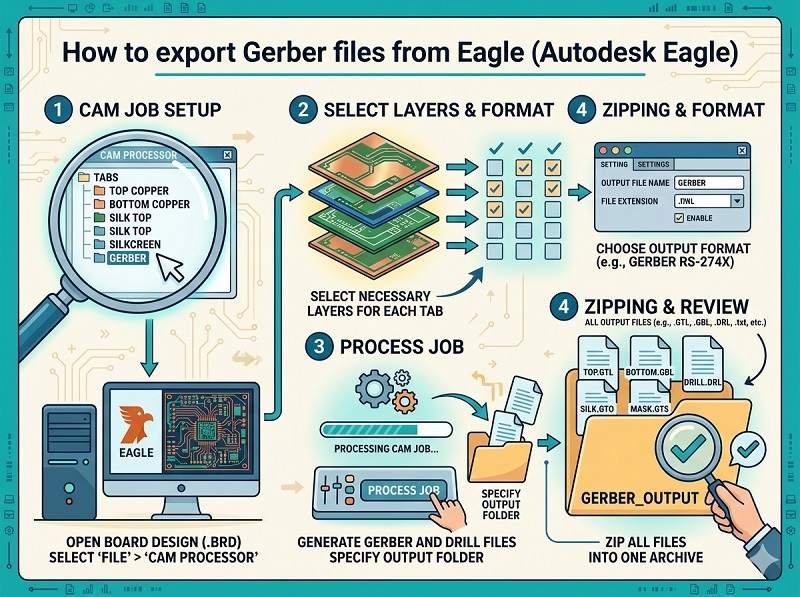
Open your PCB design
Start by opening your completed board file (.brd) in Autodesk Eagle. Make sure your design is finalized and all components are properly placed and routed.
It’s recommended to run a Design Rule Check (DRC) before exporting to ensure there are no layout errors that could affect Montaje de PCB.
Open the CAM processor
In the top menu, go to
File → CAM Processor
The CAM Processor is the tool used to generate Gerber files for Fabricación de PCB. It allows you to select layers and configure output settings.
Load a CAM job file
Eagle usually includes default CAM job files.
Click File → Open → Job, then select a standard job such as:
gerber.cam
This will automatically load predefined settings for common Gerber outputs, suitable for most Montaje de PCB requisitos.
Configure Gerber layers
Ensure the correct layers are selected for export. Typical layers include:
- Top Copper (Top)
- Bottom Copper (Bottom)
- Solder Mask Top/Bottom
- Silkscreen Top/Bottom
- Board Outline (Dimension layer)
Para Montaje SMT, accurate solder mask and silkscreen layers are especially important.
Set output format
Make sure the output format is set correctly:
- Format: RS-274X (standard Gerber format)
- Units: mm or inch (match your design settings)
- Resolution: usually 2:5 or 2:6
These settings ensure compatibility with most Fabricación de PCB suppliers.
Generate Gerber files
Click the Process Job button.
Eagle will generate a set of Gerber files, typically including:
- .GTL (Top Layer)
- .GBL (Bottom Layer)
- .GTS / .GBS (Solder Mask)
- .GTO / .GBO (Silkscreen)
- .GKO or .GML (Board Outline)
These files are essential for both fabrication and Montaje de PCB.
Export drill files
Gerber files do not include drill data, so you must export it separately.
Go to:
File → CAM Processor → Drill data (Excellon format)
This file contains hole sizes and locations, which are critical for Fabricación de PCB.
Verify Gerber files
Before sending files to your manufacturer, always verify them using a Gerber viewer.
Check that:
- All layers are aligned correctly
- Board outline is accurate
- No missing pads or traces
- Text and markings appear properly
This step helps prevent costly errors in Montaje de PCB.
Package files for submission
Finally, compress all Gerber and drill files into a single ZIP archive.
Include:
- Archivos Gerber
- Drill file
- Readme or notes (if needed)
You can now send this package to your Fabricación de PCB o Montaje de PCB supplier for quotation and production.
Conclusión
Exporting Gerber files from Autodesk Eagle is a straightforward process when using the CAM Processor with the correct settings. Proper file preparation ensures smooth Montaje SMT, reduces manufacturing errors, and speeds up your project timeline.
¿Busca una solución de montaje de PCB fiable? Haga clic a continuación para solicitar su presupuesto ahora.
Ofrecemos servicios profesionales de ensamblaje de placas de circuito impreso, incluyendo SMT, DIP y soluciones completas llave en mano.
✔ NDA disponible ✔ Presupuesto rápido en 24 horas ✔ Fábrica certificada ISO ✔ Servicio integral de PCB y PCBA.




 Español
  English
  Deutsch
  Français
  Português do Brasil
  日本語
日本語  Nederlands
  Italiano
  Русский
  한국어
한국어  العربية
  Svenska
  Polski
  Türkçe
  繁體中文
繁體中文