
Export Gerber Files from KiCad
Exporting Gerber files from KiCad is an essential step to prepare your design for Fabrication de circuits imprimés et Assemblage du circuit imprimé. These files allow manufacturers to accurately fabricate your board and ensure smooth Assemblage SMT et Assemblage de circuits imprimés clés en main.
Below is a step-by-step guide to exporting Gerber files from KiCad.
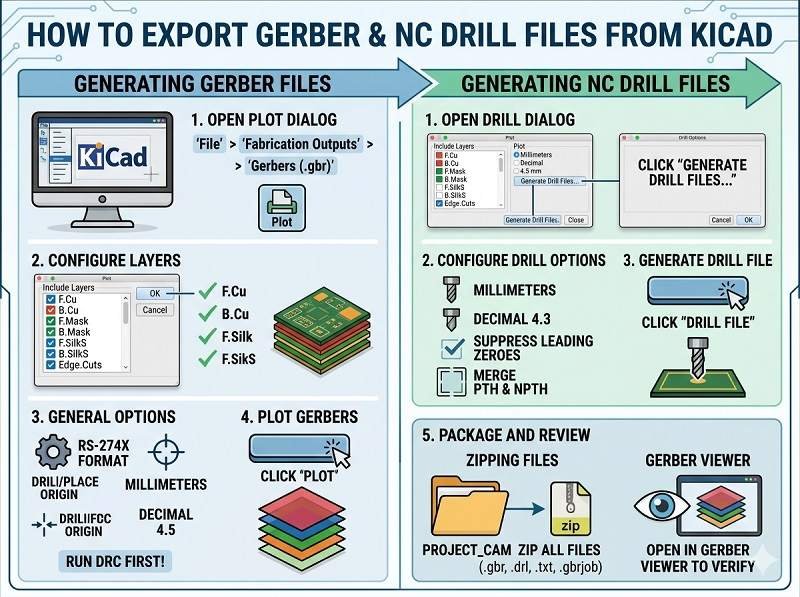
Step 1: Open Your PCB Layout
Open your PCB project in KiCad and launch the PCB Editor (PCBNew).
Before exporting, run a Design Rule Check (DRC) to ensure there are no layout errors that could affect PCB Manufacturing.
Step 2: Open Plot (Gerber) Settings
In the PCB Editor, go to:
File → Plot
This opens the Gerber export (plot) window where you configure all output settings.
Step 3: Configure General Settings
In the Plot window:
- Set Output format to Gerber
- Choisir Units (millimeters recommended)
- Set Precision (e.g., 4.6 format)
- Select Use Protel filename extensions (commonly required by manufacturers)
These settings ensure compatibility with standard Fabrication de circuits imprimés processus.
Step 4: Select Layers to Export
Choose all necessary PCB layers.
Typical layers include:
- F.Cu (Top Copper)
- B.Cu (Bottom Copper)
- Inner layers (for multilayer boards)
- F.Mask (Top Solder Mask)
- B.Mask (Bottom Solder Mask)
- F.SilkS (Top Silkscreen)
- B.SilkS (Bottom Silkscreen)
- Edge.Cuts (Board Outline)
Selecting the correct layers is critical for accurate Assemblage du circuit imprimé.
Step 5: Plot Gerber Files
Click the Plot button to generate Gerber files.
KiCad will export one file per selected layer into your chosen output directory.
Step 6: Generate Drill Files
Gerber files must be accompanied by drill data.
Click Generate Drill Files in the same window.
Configure:
- Drill units (match Gerber units)
- File format (Excellon)
Then click Generate Drill File.
This file defines hole sizes and positions for Fabrication de circuits imprimés.
Step 7: Verify Gerber Files
Always verify your Gerber files before sending them for Assemblage du circuit imprimé.
Use KiCad’s built-in Gerber Viewer (GerbView) or a third-party viewer to check:
- Layer alignment
- Board outline accuracy
- Pad and via placement
- Solder mask openings
Verification helps prevent issues during Assemblage SMT.
Step 8: Prepare Full Assembly Package
Pour Assemblage de circuits imprimés clés en main, you should provide a complete set of files:
- Fichiers Gerber
- Drill files
- Nomenclature (Bill of Materials)
- Pick and place (centroid) file
- Dessins d'assemblage
This ensures smooth coordination between PCB fabrication and assembly.
Common Mistakes to Avoid
- Forgetting the Edge.Cuts layer (board outline)
- Missing solder mask or silkscreen layers
- Using inconsistent units between files
- Not generating drill files
- Skipping file verification
Avoiding these mistakes helps ensure a successful PCB Manufacturing process.
Conclusion
Exporting Gerber files from KiCad is a straightforward process when done correctly. By selecting the right layers, generating drill files, and verifying outputs, you can ensure accurate results in Fabrication de circuits imprimés, Assemblage SMT, et Assemblage de circuits imprimés clés en main.
A complete and correct file package reduces errors, shortens lead times, and guarantees high-quality PCB production.
Votre solution d'assemblage de circuits imprimés commence ici. Cliquez ci-dessous pour demander un devis.
Nous fournissons des services professionnels d'assemblage de circuits imprimés, y compris SMT, DIP et des solutions complètes clé en main.
✔ NDA disponible ✔ Devis rapide sous 24 heures ✔ Usine certifiée ISO ✔ Service unique de PCB et PCBA




 Français
  English
  Deutsch
  Português do Brasil
  Español
  日本語
日本語  Nederlands
  Italiano
  Русский
  한국어
한국어  العربية
  Svenska
  Polski
  Türkçe
  繁體中文
繁體中文