
File formats do you support
In PCB Assembly and PCB Manufacturing, supporting the right file formats is essential for accurate production, smooth communication, and efficient SMT Assembly. Most professional manufacturers support a wide range of industry-standard formats to accommodate different design tools and workflows.
Below is a comprehensive overview of commonly supported file formats.
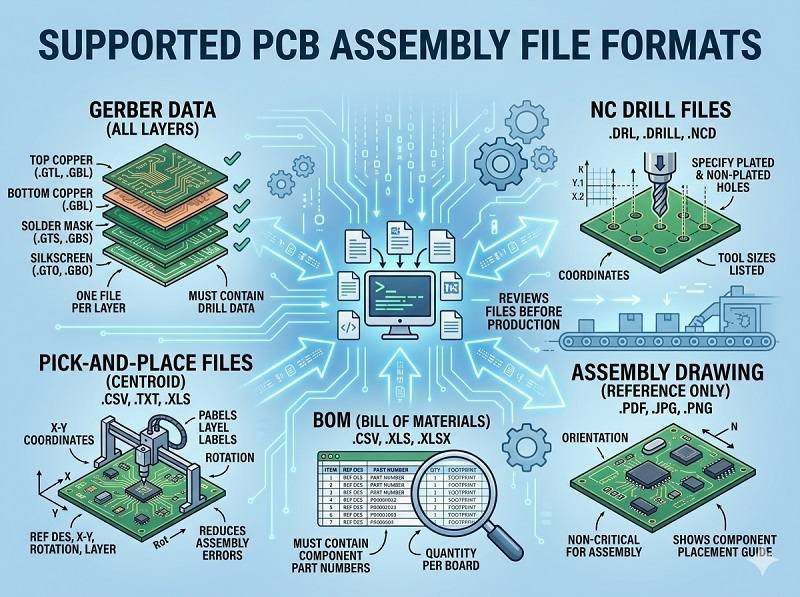
PCB design and fabrication files
These files define the physical structure of the PCB and are required for PCB Manufacturing.
- Gerber files (RS-274X) – The most widely used format for PCB fabrication, including copper layers, solder mask, and silkscreen
- ODB++ – A complete manufacturing dataset that includes layers, netlist, and component data
- IPC-2581 – An advanced all-in-one format containing fabrication and assembly information
- Drill files (Excellon format) – Defines hole sizes and locations
Gerber is still the industry standard, but ODB++ and IPC-2581 are becoming more popular for advanced PCB Assembly workflows.
Assembly files for SMT Assembly
These files are required for component placement and SMT Assembly.
- Pick and Place file (Centroid file) – Contains component coordinates, rotation, and reference designators
- BOM (Bill of Materials) – Lists all components with MPNs, quantities, and specifications
- Assembly drawing – Visual reference for component placement, polarity, and special notes
These files ensure accurate and automated PCB Assembly.
Design source files (optional but supported)
Some manufacturers also accept native design files for better engineering support.
- Altium Designer (.PCB, .PcbDoc)
- KiCad files
- Autodesk Eagle (.brd, .sch)
While not always required, these files can help with DFM, DFA, and troubleshooting in Prototype PCB Assembly.
Testing and additional files
For complete production and validation, additional files may be used.
- Test files (ICT, flying probe data if available)
- Programming files (HEX, BIN, or firmware)
- Special process instructions (coating, testing, packaging)
These help ensure quality and functionality after PCB Assembly.
File packaging formats
To submit your project, files should be compressed into a single archive.
Supported formats include:
- .ZIP (recommended)
- .RAR
- .7Z
Organizing all files clearly in one package speeds up quotation and production.
Best practices for file submission
To ensure smooth PCB Assembly, follow these guidelines:
- Use standard formats like Gerber and Excellon
- Ensure consistency between BOM and pick-and-place files
- Include clear naming conventions
- Provide complete documentation
- Add notes for special requirements
These practices reduce errors and improve efficiency in both SMT Assembly and PCB Manufacturing.
Conclusion
Most manufacturers support a wide range of file formats, including Gerber, ODB++, IPC-2581, BOM, and pick-and-place files. Providing complete and standardized data ensures accurate PCB Assembly, efficient SMT Assembly, and reliable PCB Manufacturing.
For best results, always confirm supported formats with your supplier and submit a well-organized file package, especially for Prototype PCB Assembly projects.
Looking for a turnkey PCB assembly service? Click below to get started.
We provide professional PCB assembly services including SMT, DIP, and full turnkey solutions.
✔ NDA Available ✔ Fast Quotation Within 24 Hours ✔ ISO Certified Factory ✔ One-stop PCB & PCBA Service




 English
  Deutsch
  Français
  Português do Brasil
  Español
  日本語
日本語  Nederlands
  Italiano
  Русский
  한국어
한국어  العربية
  Svenska
  Polski
  Türkçe
  繁體中文
繁體中文