
Beschadigde coating repareren
Beschadigd repareren Conforme coating is een veelvoorkomende taak in PCB-assemblage en SMT-assemblage, Vooral wanneer er defecten, schade door behandeling of herbewerking van componenten optreden. Een correct reparatieproces herstelt de beveiliging zonder de prestaties van het circuit aan te tasten.
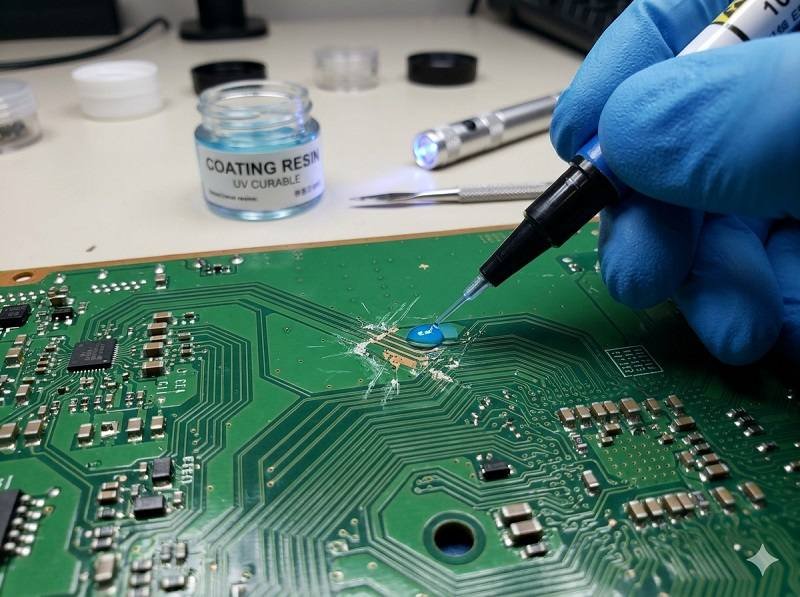
Het schadetype identificeren
Bepaal vóór reparatie het probleem:
- Krassen of dunne coatinggebieden
- Scheuren of afschilferen
- Bubbels of holtes
- Verontreiniging onder de coating
- Verbrande of chemisch beschadigde plekken
Inzicht in het defect helpt bij het kiezen van de juiste reparatiemethode in Turnkey PCB-assemblage.
Selecteer de juiste reparatiemethode
Verschillende coatings vereisen verschillende benaderingen:
- Acrylcoatings → gemakkelijk op te lossen en opnieuw te bewerken
- Siliconencoatings → flexibel maar moeilijker te verwijderen
- Urethaan coatings → chemische weerstand, middelmatige moeilijkheidsgraad
- Epoxy coatings → erg taai, moeilijk te repareren
Door de juiste methode te kiezen, voorkomt u verdere schade aan de printplaat.
Verwijder de beschadigde coating
Gebruik geschikte verwijderingstechnieken:
- Verwijdering van oplosmiddelen voor acrylcoatings
- Mechanische verwijdering (schrapen, microschuren) voor gelokaliseerde gebieden
- Chemisch strippen voor sterkere coatings
- Gecontroleerde warmte om bepaalde materialen zachter te maken
In PCB-assemblage, Het verwijderen moet beperkt blijven tot het beschadigde gebied om de omliggende onderdelen te beschermen.
Reinig het oppervlak grondig
Na verwijdering:
- Gebruik goedgekeurde reinigingsmiddelen
- Verwijder residuen, stof en verontreinigingen
- Zorg ervoor dat het gebied volledig droog is
Een goede reiniging is essentieel voor een goede hechting bij het opnieuw aanbrengen. Conforme coating.
Repareer de printplaat indien nodig
Als de schade het circuit heeft aangetast:
- Onderdelen vervangen of opnieuw solderen
- Reparatiesporen of -kussentjes
- Elektrische controles uitvoeren
Deze stap zorgt ervoor dat de printplaat volledig functioneert voordat deze opnieuw wordt gecoat in SMT-assemblage.
Coating opnieuw aanbrengen
Breng nieuwe coating aan op het gerepareerde gebied:
- Gebruik borstel-, spuit- of selectieve coatingmethoden
- Waar mogelijk overeenkomen met het oorspronkelijke coatingtype
- Gelijkmatige dikte en soepele dekking
Vermijd het overcoaten van connectoren, testpunten en andere zones zonder coating in Turnkey PCB-assemblage.
De coating uitharden
Het uitharden hangt af van het materiaal:
- Drogen aan de lucht (acryl)
- Uitharding door warmte (urethaan, epoxy)
- UV-uitharding (UV-uithardbare coatings)
Volg de juiste uithardingsomstandigheden om duurzaamheid te garanderen.
Inspecteer het gerepareerde gebied
Na uitharding:
- Gebruik UV-inspectie om de dekking te controleren
- Controleer of er geen luchtbellen, gaten of verontreinigingen zijn
- Controleer de juiste hechting en dikte
Inspectie zorgt ervoor dat de reparatie voldoet aan PCB-assemblage kwaliteitsnormen.
Beste praktijken voor coatingreparatie
- Gebruik waar mogelijk coatings die gemakkelijk kunnen worden bewerkt
- Beperk het reparatiegebied tot een minimum om onnodige verwijdering te voorkomen
- Strikte reinigings- en behandelingsprocedures volgen
- Technici opleiden voor nauwkeurige reparaties
Conclusie
Beschadigd repareren Conforme coating omvat zorgvuldig verwijderen, schoonmaken, repareren en opnieuw aanbrengen. In PCB-assemblage, SMT-assemblage, en Turnkey PCB-assemblage, Een goed gecontroleerd reparatieproces herstelt de bescherming, behoudt de betrouwbaarheid en verlengt de levensduur van elektronische producten.
Vraag een offerte aan voor conforme coating
Wilt u de betrouwbaarheid van uw PCB's verbeteren met conformal coating? Stuur ons dan nu uw gegevens.
Stuur ons je vereisten en krijg snel antwoord van ons engineeringteam.
✔ 24-uurs respons ✔ Engineering-ondersteuning ✔ Kleine & massaproductie
Shenzhen Tengxinjie Electronics Co, Ltd.
 Nederlands
  English
  Deutsch
  Français
  Português do Brasil
  Español
  日本語
日本語  Italiano
  Русский
  한국어
한국어  العربية
  Svenska
  Polski
  Türkçe
  繁體中文
繁體中文