
Avoid BOM errors
Avoiding BOM (Bill of Materials) errors is critical for ensuring smooth Montagem de PCB, accurate costing, and on-time delivery. Even small mistakes in the BOM can lead to incorrect components, production delays, or costly rework in both Montagem de protótipo de PCB e produção em massa.
By following structured processes and best practices, you can significantly reduce BOM-related risks in Montagem SMT e Fabricação de PCBs.
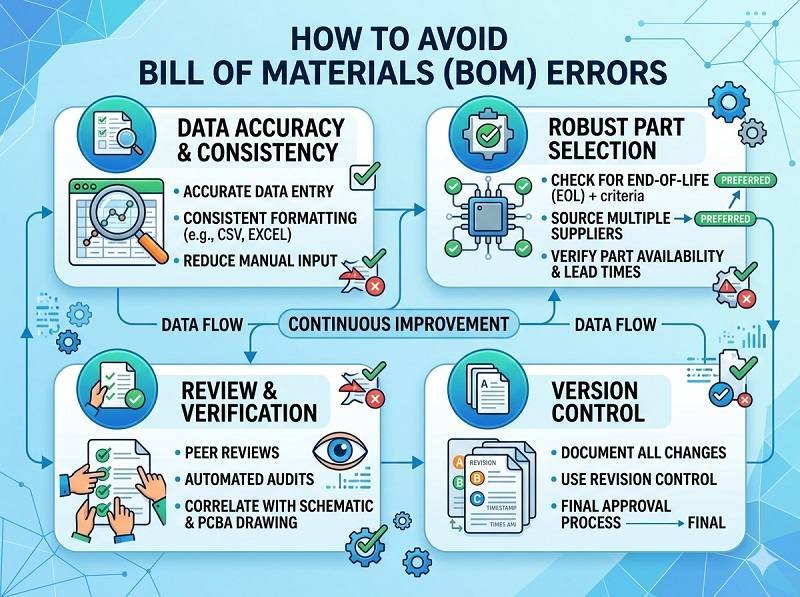
Use standardized and complete BOM format
A clear and standardized BOM format is the foundation of error prevention.
Your BOM should include:
- Manufacturer Part Number (MPN)
- Component description and value
- Package type (e.g., 0603, QFN, BGA)
- Quantity per board
- Reference designators (RefDes)
- Approved manufacturer or supplier
Avoid vague descriptions like “resistor 10K” without specifying tolerance or package size. A complete BOM ensures accurate sourcing and smooth Montagem de PCB.
Always use manufacturer part numbers (MPN)
Relying on internal part numbers or generic descriptions increases the risk of incorrect sourcing.
Using precise MPNs ensures that the correct component is purchased for Montagem SMT. It also helps suppliers quickly identify parts and avoid confusion, especially when dealing with similar components.
Maintain consistency between BOM and design files
One of the most common BOM errors comes from mismatches between the BOM and PCB design data.
Ensure that:
- BOM matches the schematic and layout
- Reference designators are consistent
- Component values and packages are identical
Consistency is essential for automated Montagem de PCB processes and prevents placement errors.
Validate footprint and package information
Incorrect footprint or package definitions can lead to serious assembly issues.
Double-check that each component’s package in the BOM matches the PCB footprint used in the layout. For example, mixing up 0402 and 0603 packages can cause placement failures in Montagem SMT.
Performing footprint validation before Fabricação de PCBs reduces costly rework.
Check component availability early
Supply chain issues are a major source of BOM errors.
Before finalizing your BOM, verify component availability through distributors. Avoid obsolete or hard-to-source parts whenever possible.
Including alternative or second-source components in your BOM improves flexibility and prevents delays in Montagem de PCB.
Use version control for BOM management
BOM changes are common during product development, especially in Montagem de protótipo de PCB.
Implement version control to track revisions and ensure all stakeholders are using the latest BOM. Clearly label versions and communicate updates to your Montagem de PCB provider.
This prevents outdated or incorrect BOMs from being used in production.
Perform DFM and BOM review
Before releasing your project for Fabricação de PCBs, conduct a Design for Manufacturability (DFM) and BOM review.
This process helps identify:
- Duplicate or missing components
- Incorrect values or packages
- Inconsistent data between files
Many professional Montagem de PCB suppliers offer BOM verification as part of their service, which can further reduce errors.
Use automated BOM tools
Modern EDA tools and BOM management software can help minimize human error.
These tools can:
- Automatically generate BOM from schematics
- Validate part numbers
- Check for duplicates or inconsistencies
Automation improves accuracy and efficiency in both Montagem SMT and procurement processes.
Comunique-se claramente com seu fabricante
Clear communication with your Montagem de PCB partner is essential.
Provide complete documentation, including BOM, Gerber files, and pick-and-place data. If there are special requirements or approved substitutions, clearly specify them.
Early communication helps manufacturers identify potential issues before production begins.
Double-check before submission
Before sending your BOM for quotation or production, perform a final review.
Check for:
- Missing MPNs
- Incorrect quantities
- Formatting errors
- Duplicate entries
A thorough final check can prevent costly mistakes in Montagem de PCB and ensure a smooth production process.
Conclusão
Avoiding BOM errors requires attention to detail, proper documentation, and strong process control. By using standardized formats, validating data, and collaborating closely with your Montagem de PCB provider, you can significantly reduce risks.
Se você estiver trabalhando em Montagem de protótipo de PCB or scaling to mass production, a well-prepared BOM ensures efficient Montagem SMT, accurate Fabricação de PCBs, and overall project success.
Tem um projeto de PCB em mente? Solicite uma cotação e obtenha suporte especializado hoje mesmo.
Oferecemos serviços profissionais de montagem de PCBs, incluindo SMT, DIP e soluções completas prontas para uso.
NDA disponível ✔ Cotação rápida em 24 horas ✔ Fábrica com certificação ISO ✔ Serviço completo de PCB e PCBA

 Português do Brasil
  English
  Deutsch
  Français
  Español
  日本語
日本語  Nederlands
  Italiano
  Русский
  한국어
한국어  العربية
  Svenska
  Polski
  Türkçe
  繁體中文
繁體中文